This is an old revision of the document!
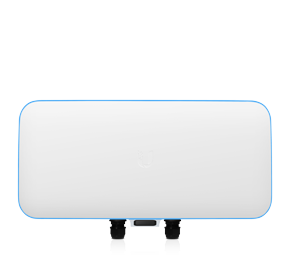
UniFi WiFi Basestation XG
THIS IS A Early Access (EA) DEVICE!!
NOT for install
NOT for bidding on upcoming jobs
NOT for production use
Use at your own risk and please let Ubiquiti know if you find issues. As this device is unrelease there is VERY little info on it. Beta users have access for testing only. It may be perfect, it may summon an long forgotten alien race, who knows at this point.
Series Type: UniFi XG
Website Link: Basestation XG
Model: UWB-XG (UWB-XG-BK Black housing)
Type: Quad-Radio 802.11ac Wave 2 Access Point with Dedicated Security and Beamforming Antenna
Description: High-Performance Wi-Fi Specifically Designed for Stadiums and Large Events –EA–
Specifications
| UAP‑nanoHD | |
|---|---|
| Dimensions | 160 x 160 x 32.65 mm (6.30 x 6.30 x 1.29") |
| Weight | 300 g (10.6 oz) |
| With Mounting Kits | 315 g (11.1 oz) |
| Networking Interface | (1) 10/100/1000 Ethernet Port |
| Buttons | Reset |
| Power Method | 802.3af PoE |
| Power Supply | UniFi Switch (PoE) |
| Maximum Power Consumption | 10.5W |
| Supported Voltage Range | 44 to 57VDC |
| Maximum TX Power | |
| 2.4 GHz | 23 dBm |
| 5 GHz | 26 dBm |
| MIMO | |
| 2.4 GHz | 2x2 |
| 5 GHz | 4x4 |
| Radio Rates | |
| 2.4 GHz | 300 Mbps |
| 5 GHz | 1733 Mbps |
| Antennas | 2.4 GHz: 2.8 dBi each, 5 GHz: 3 dBi each |
| Wi-Fi Standards | 802.11 a/b/g/n/ac/ac-wave2 |
| Wireless Security | WEP, WPA-PSK, WPA-Enterprise (WPA/WPA2, TKIP/AES) |
| BSSID | Up to 8 per Radio |
| Mounting | Wall/Ceiling (Kits Included) |
| Operating Temperature | -10 to 70° C (14 to 158° F) |
| Operating Humidity | 5 to 95% Noncondensing |
| Certifications | CE, FCC, IC |
| Advanced Traffic Management | |
|---|---|
| VLAN | 802.1Q |
| Advanced QoS | Per-User Rate Limiting |
| Guest Traffic Isolation | Supported |
| WMM | Voice, Video, Best Effort, and Background |
| Concurrent Clients | 200+ |
| Supported Data Rates (Mbps) | |
|---|---|
| Standard | Data Rates |
| 802.11ac | 6.5 Mbps to 1.7 Gbps (MCS0 - MCS9 NSS1/2/3/4, VHT 20/40/80/160) |
| 802.11n | 6.5 Mbps to 300 Mbps (MCS0 - MCS15, HT 20/40) |
| 802.11a | 6, 9, 12, 18, 24, 36, 48, 54 Mbps |
| 802.11g | 6, 9, 12, 18, 24, 36, 48, 54 Mbps |
| 802.11b | 1, 2, 5.5, 11 Mbps |
LED Status Light Ring
- Blue Ring - Solid
- Normal Operation
- White Ring - Flashing
- Unconfigured state
Troubleshooting tips
- No light/power
- Check ethernet connection.
- Are you connected to a PoE enabled switch or PoE injector?
- Does the switch/injector have power?
- Can only connect to the primary/default VLAN
- Check that your switch port has all VLANs enabled (Try cycling the port through 'Disabled')
FAQ
- How many networks can I run off of this one AP?
- Up to 8 per Radio
- Does this AP come with a PoE injector for use on a non-PoE enabled switch?
- No, it is recommended to use them with a PoE enabled switch like the UniFi Switch 8-60W or better.